
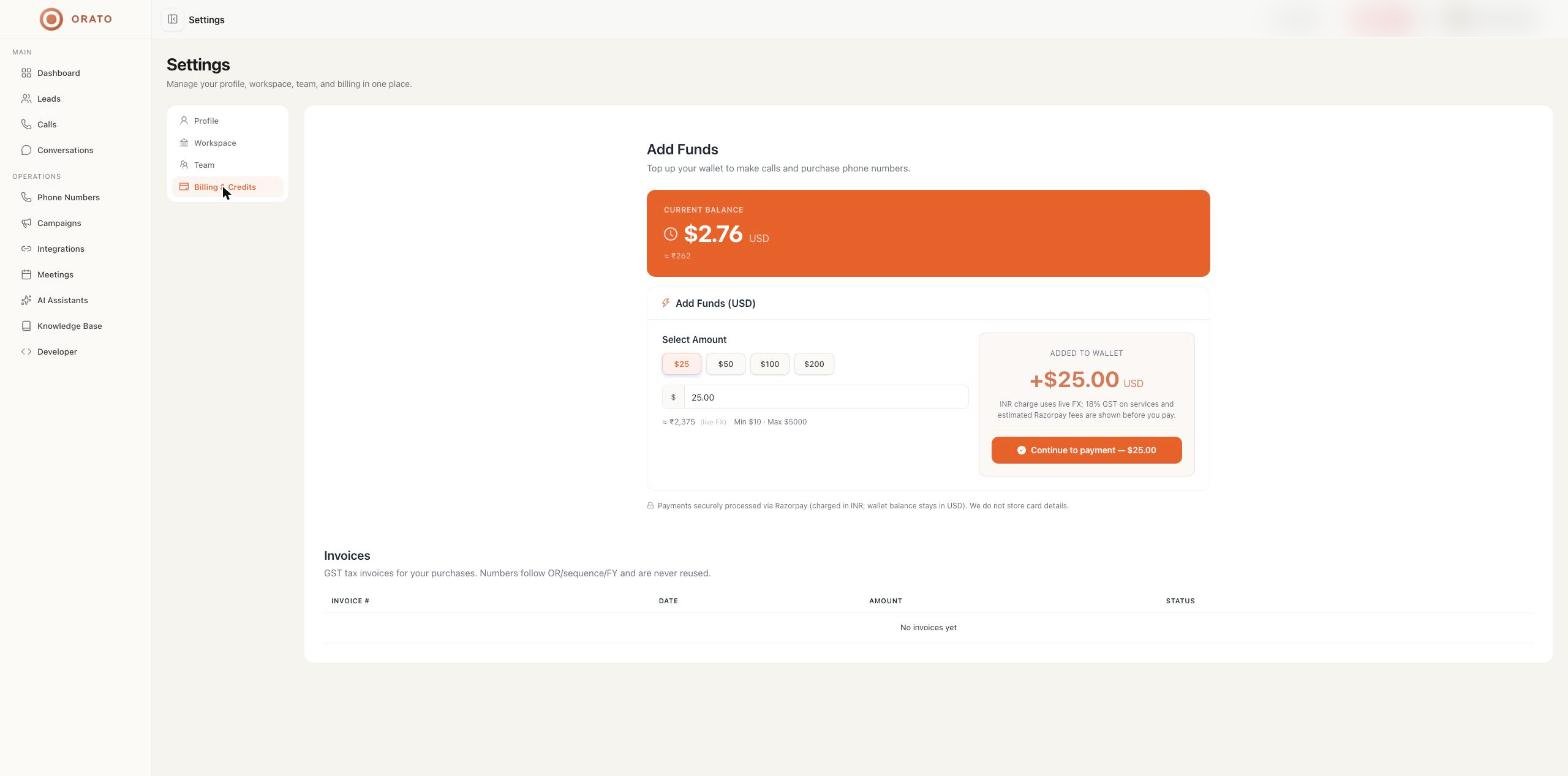
Check your balance
Your balance is always visible in the top bar of the app. Full details are in Settings → Billing & Credits, which shows the Current balance in USD with an approximate INR value.Add funds
1
Open Billing & Credits
Go to Settings → Billing & Credits, or click Add funds on the Phone Numbers page.
2
Choose an amount
Pick $25**, **$50, $100**, or **$200, or enter a custom amount. The minimum is $10 and the maximum is $5,000.
3
Pay
Click Continue to payment. Payments are processed securely by Razorpay.
You’re charged in INR at the live exchange rate, and your wallet stays in USD. 18% GST on services and estimated Razorpay fees are shown before you pay. Orato does not store card details.
What uses wallet credit
Track spend on the Dashboard (Usage cost (USD) and Billable Minutes) and per conversation on Conversations.
Invoices
GST tax invoices for your purchases are listed under Invoices with invoice number, date, amount, and status. Invoice numbers follow the formatOR/sequence/FY and are never reused.
Set the legal name, address, and GSTIN printed on invoices under Workspace.