Voice
1
Pick a provider
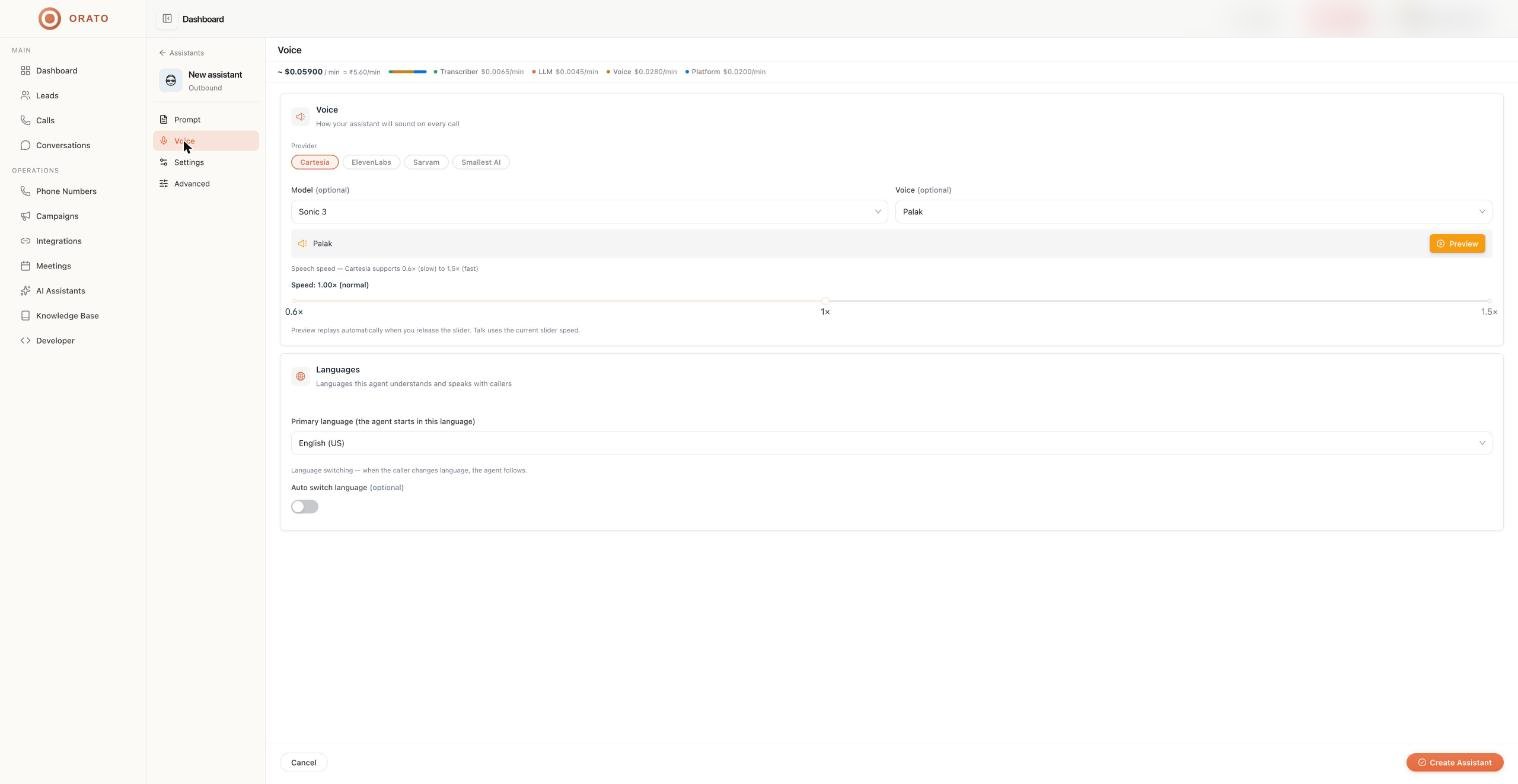
Choose Cartesia, ElevenLabs, Sarvam, or Smallest AI. The cost estimate at the top of the page updates when you switch.
2
Pick a model and voice
Model and Voice are optional. If you leave them, Orato uses the provider’s default.
3
Preview
Click Preview to hear the selected voice.
4
Set the speed
Drag the Speed slider. The preview replays automatically when you release it, and Talk uses the same speed.
Providers compared
Languages
Primary language
The language the agent starts the conversation in. Options include:- English (US)
- English (India)
- Hindi
- Tamil
- Telugu
- Marathi
- Gujarati
- Bengali
Auto switch language
Turn on Auto switch language to let the agent follow the caller. If the caller switches language mid-call, the agent switches too.For the best results in a non-English language, also translate your instructions with Translate prompt on the Prompt tab and choose a voice that supports that language.
Next steps
Settings
Choose the role and AI model.
Multilingual assistants
Serve callers in Hindi and regional languages.